How to Find Brand Mentions in Ahrefs and Semrush: A Step-by-Step Guide

Explore this post with:
Ahrefs Content Explorer finds mentions your brand has already earned across its indexed pages. Semrush Brand Monitoring tracks new mentions as they appear. Use both for full coverage, or pick the one that fits your workflow. Either way, this guide walks you through the exact steps to find brand mentions in Ahrefs and Semrush.
Before You Start: What You’ll Need
Two things will save you time before you open either tool.
First, a plan that includes the feature. In Ahrefs, Content Explorer is available on the Standard plan and higher, not the Lite plan, while Brand Radar (its AI tracking) is a paid add-on. In Semrush, Brand Monitoring runs as a separate application via Semrush.
Second, a complete list of your brand terms. Write these down before you search, because missing one means missing mentions:
- Your exact brand name
- Product and feature names
- Founder and key executive names
- Common misspellings and spacing variants
- Your domain (to exclude your own site)
With that list ready, the searches below take minutes instead of guesswork.
How to Find Brand Mentions in Ahrefs
Ahrefs Content Explorer is the fastest way to find Ahrefs brand mentions, since it searches a large index of web pages for every existing mention. Here is the step-by-step.
Step 1: Search Your Brand in Content Explorer
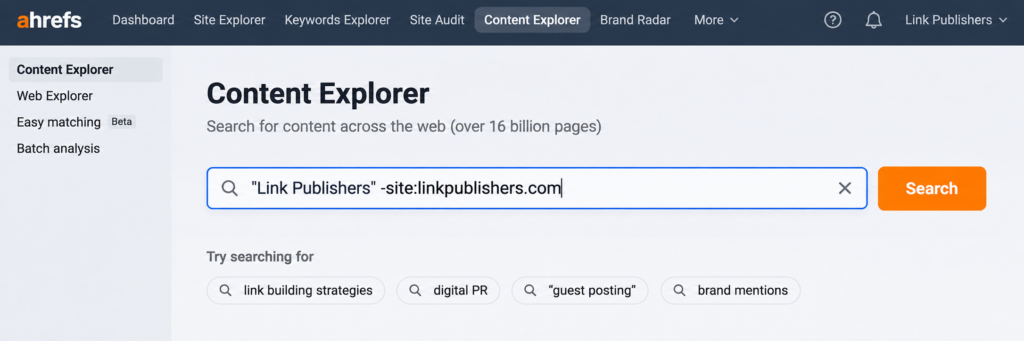
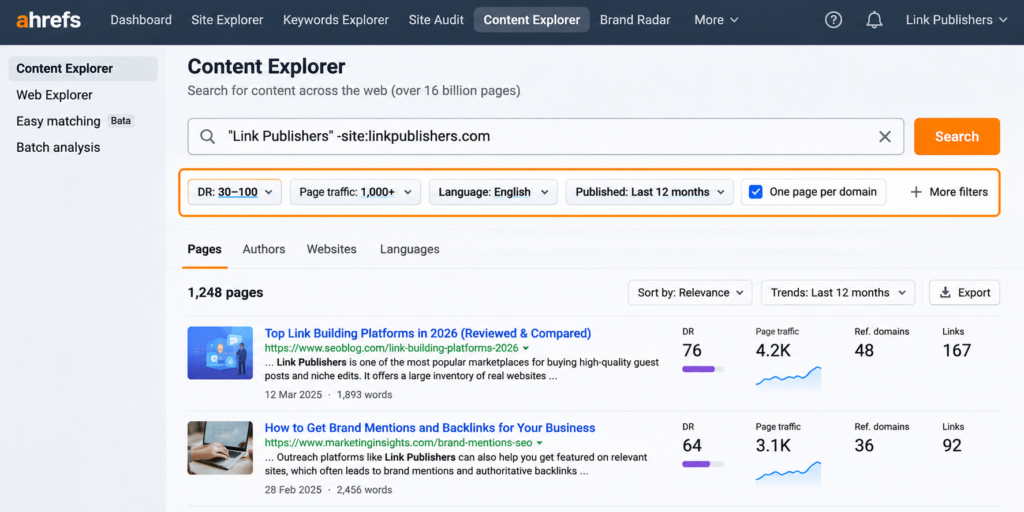
Open Content Explorer and search your brand name in quotation marks for an exact match. For example: “Link Publishers”. Then exclude your own site so your own pages do not clog the results, using the minus operator: “Link Publishers” -site:linkpublishers.com.
This returns matching pages in Ahrefs’ Content Explorer index that mention your brand, excluding pages from your own domain.
Step 2: Filter for Quality
A raw brand search returns too much noise. Narrow it with Content Explorer’s filters so you only see mentions worth your time:
- Domain Rating (DR): set a floor so you focus on credible sites
- Page traffic: prioritise pages that actually get visitors, since a mention on a trafficked page carries real value
- Language: match your target market
- Published or first-seen date: focus on recent mentions for outreach
- One page per domain: avoid ten results from the same site
Step 3: Highlight Unlinked Mentions
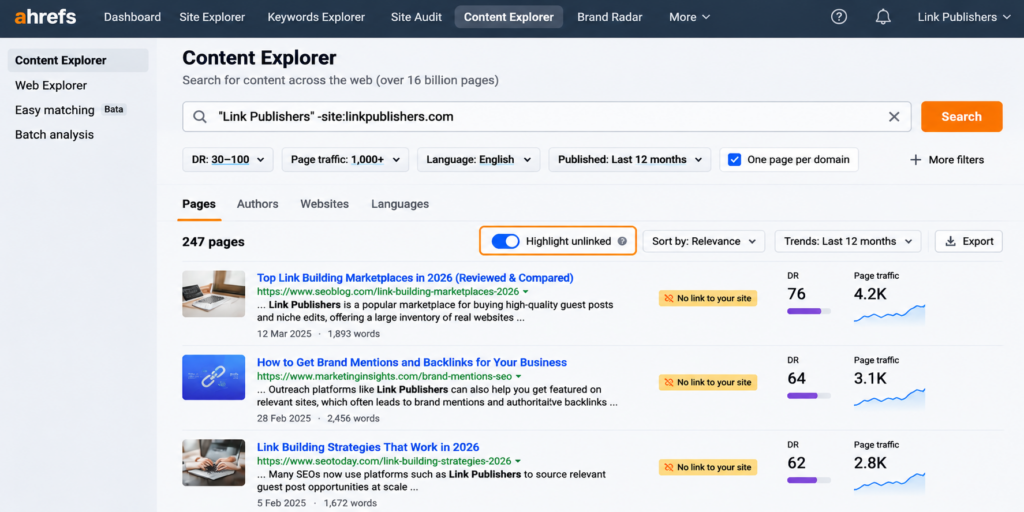
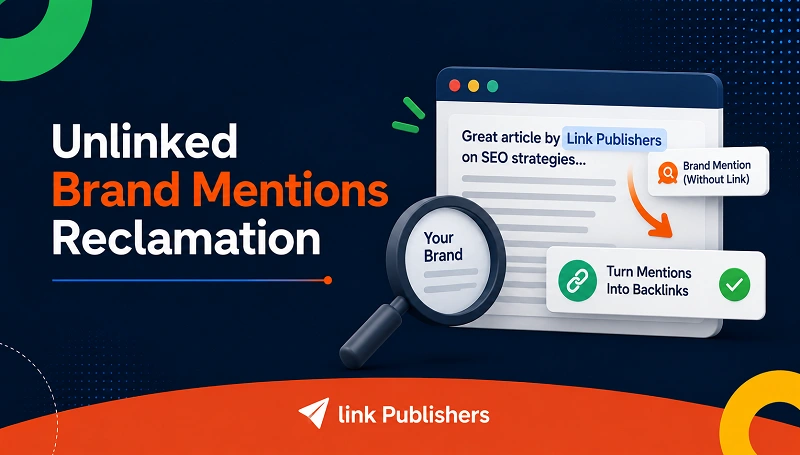
This is the step that makes Content Explorer genuinely useful. It can highlight which pages mention your brand without linking to it. Enter your domain in the “highlight unlinked” option, and Content Explorer flags every mention that is not already a link back to you.
Those highlighted, unlinked pages are your reclamation targets, sites that already talk about you but have not linked yet. Finding Ahrefs unlinked brand mentions can provide opportunities to contact publishers and request a link to your website.
Step 4: Export and Double-Check the List
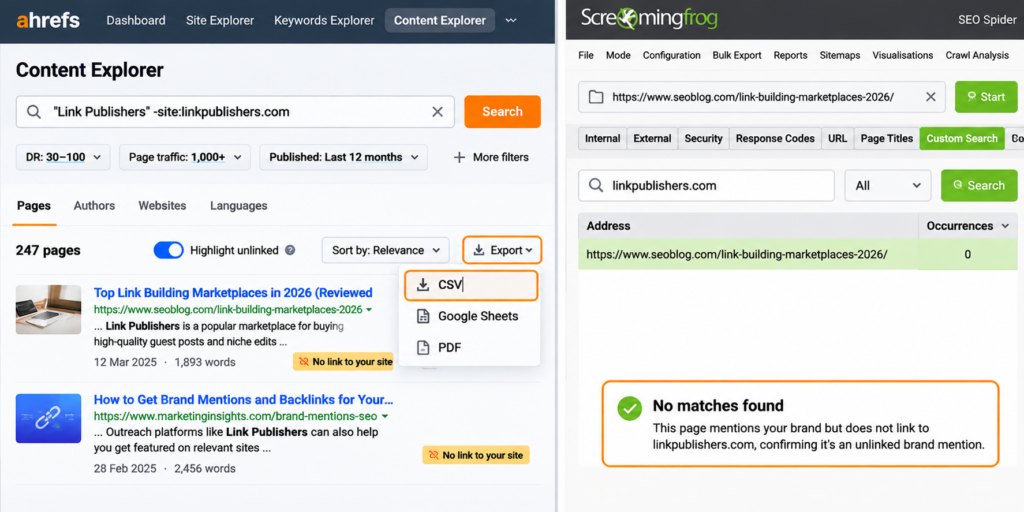
Export your filtered list to CSV. Then verify a sample by hand, because tools occasionally misreport link status. The reliable check is to crawl the exported URLs with Screaming Frog using a custom search for your domain, which confirms whether each page genuinely links to you or not.
This verification step matters most when you are about to run outreach. Pitching a site to “add a link” when they already linked you makes you look careless.
Step 5: Set Up Ahrefs Alerts for New Mentions
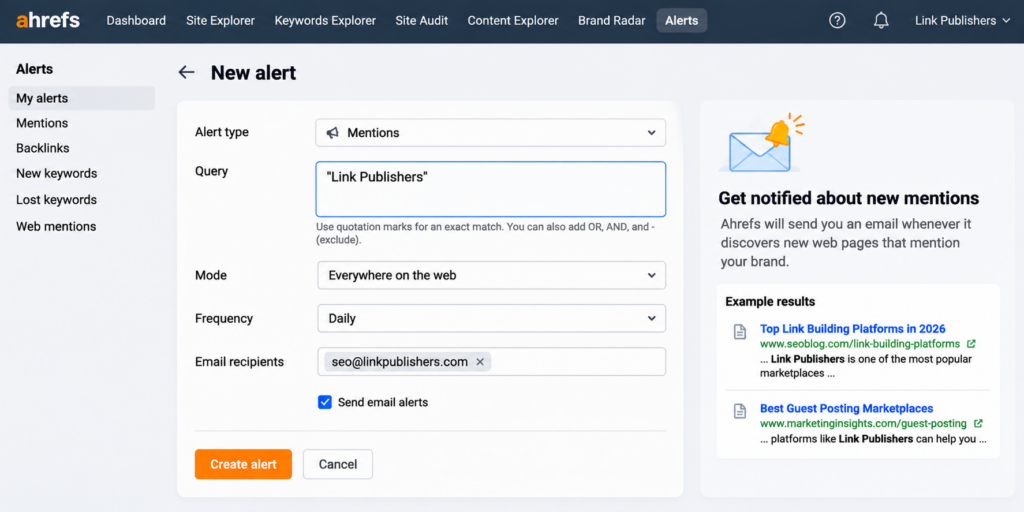
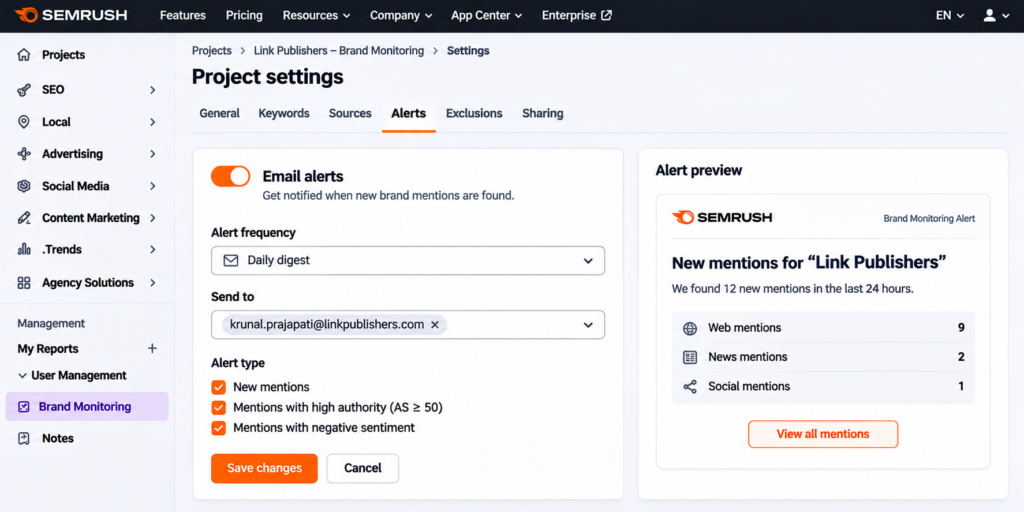
Finding past mentions is half the job. To catch new ones automatically, set up an Ahrefs Alert for your brand name. Ahrefs sends email notifications for new Ahrefs mentions whenever it discovers a page matching your alert query.
Set up alerts for important brand terms, such as your company name, main products and founder names, to monitor additional mentions.
Step 6: Check AI Mentions (Optional)
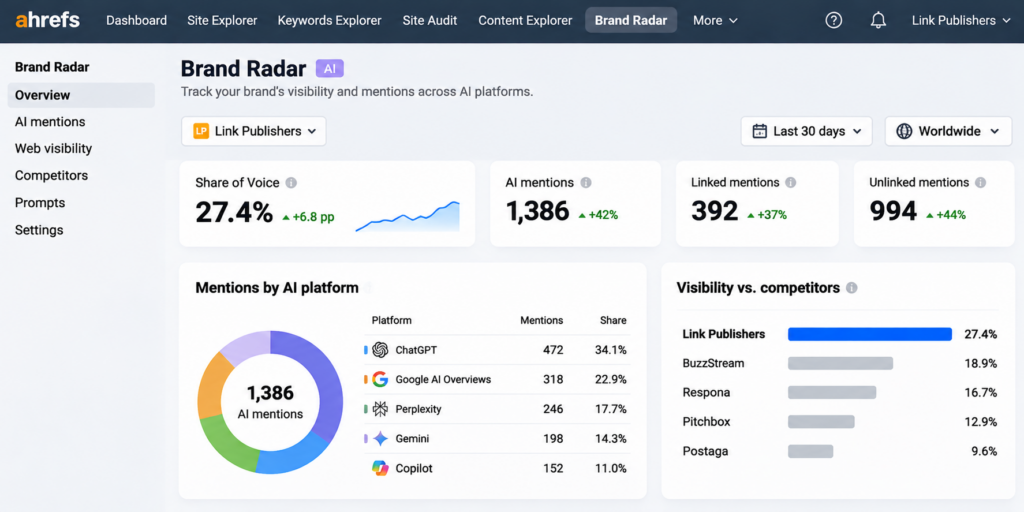
If you want to see where your brand appears in AI answers, Ahrefs Brand Radar tracks mentions and citations across ChatGPT, Perplexity, Gemini, Google AI Overviews, AI Mode, and Copilot. It distinguishes linked citations from unlinked mentions and shows your Share of Voice against competitors. Its Web Visibility module also tracks linked and unlinked mentions across the wider web.
Brand Radar offers separately purchasable AI platform indexes, while custom prompt tracking is also available with eligible paid Ahrefs plans.
How to Find Brand Mentions in Semrush
Where Content Explorer is built for finding mentions that already exist, Semrush Brand Monitoring is built to track new mentions as they appear. Here is the step-by-step.
Step 1: Set Up a Brand Monitoring Project
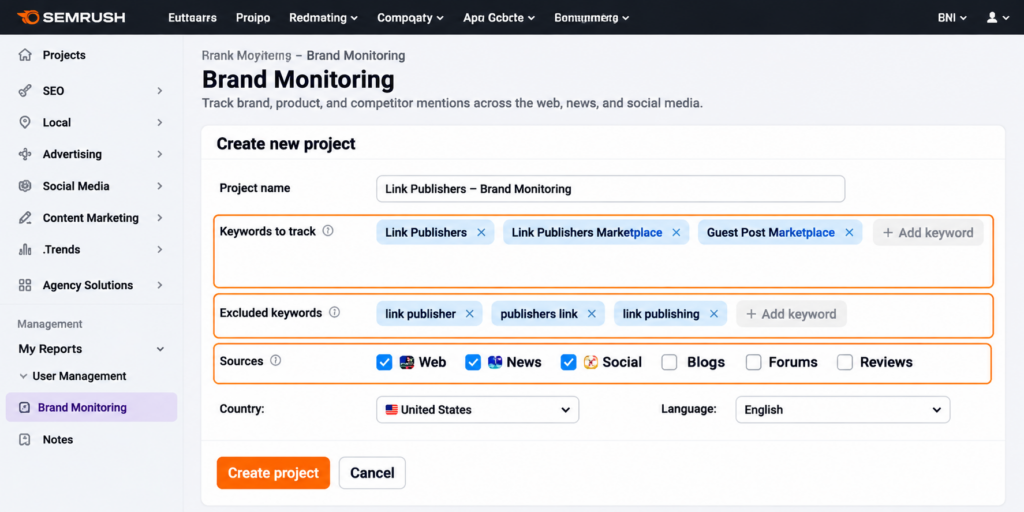
Open Brand Monitoring and create a new project. Enter the terms you want tracked, then refine the setup so it captures the right mentions:
- Keywords: your brand name, product names, and founder names
- Exclusions: add irrelevant terms or keywords to refine the results and reduce unrelated mentions
- Sources: web, news, and social, depending on where you want coverage
Once the project runs, Semrush begins collecting mentions and keeps updating as new ones appear.
Step 2: Filter Mentions by Source, Authority and Sentiment
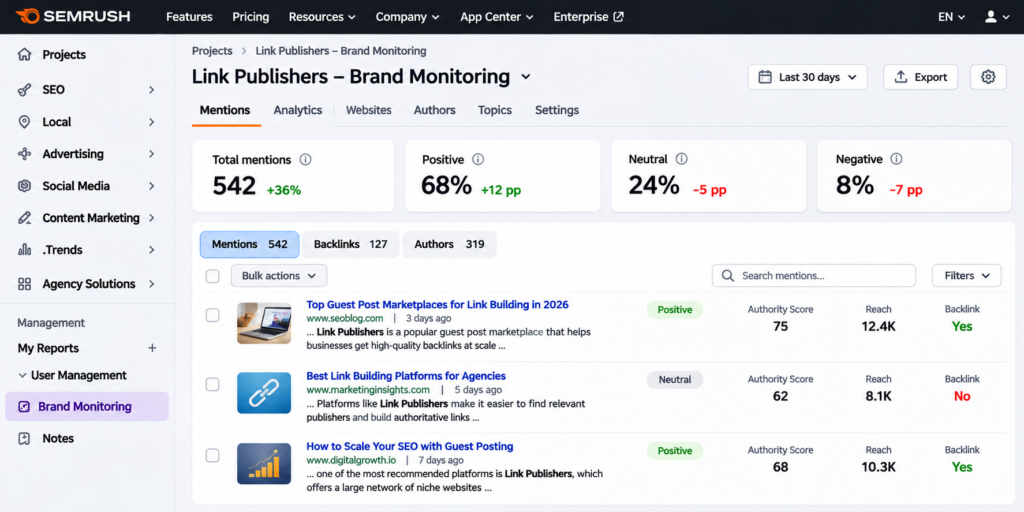
A live mention feed needs filtering to be useful. Semrush lets you narrow the results by:
- Source type: separate editorial web mentions from social and news
- Authority: focus on mentions from stronger domains first
- Sentiment: sort positive, neutral, and negative mentions apart
Sentiment filtering is the quiet winner here. It surfaces negative mentions fast, so you can respond before they spread, and it flags positive ones worth amplifying.
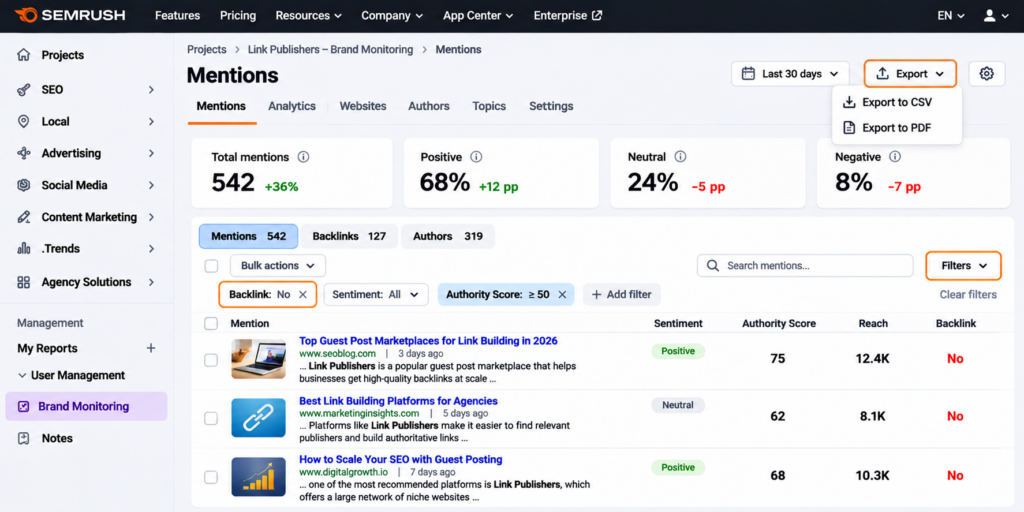
Step 3: Isolate Mentions Without a Link
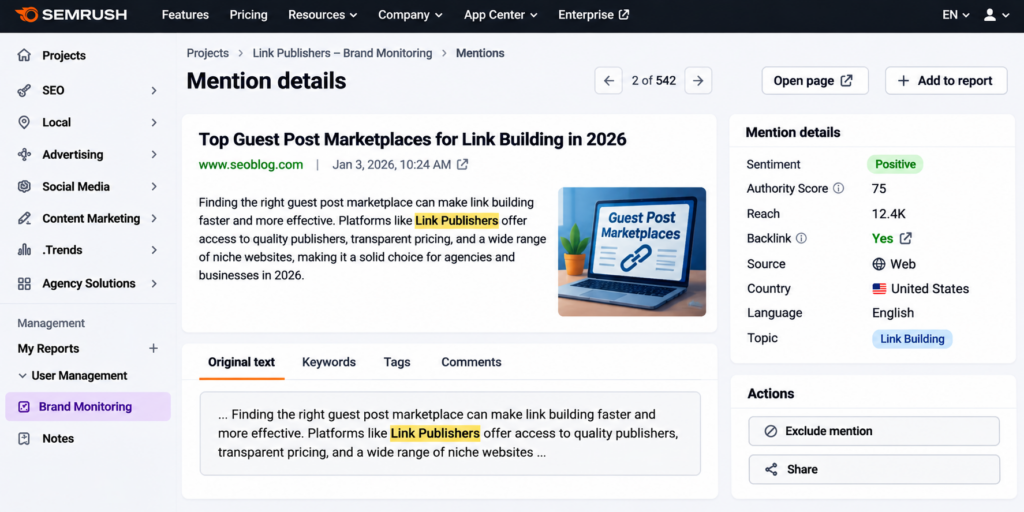
To find reclamation targets, first enter your website or target landing-page URL in the Track backlinks field when setting up the query. You can then use the Backlinks filter to show mentions that include or do not include a link to that URL.
This is how you find unlinked brand mentions in Semrush. The Backlinks filter provides a similar way to identify mentions without a link to your specified URL
Step 4: Add Competitors to Find Mentions You’re Missing
Add your competitors’ brand names as separate projects or tracked terms. This shows you where they get mentioned, and you do not, which is a ready-made prospect list. If a site runs a “best tools” roundup that names three competitors but not you, that is a direct pitch opportunity.
Learning to track competitor mentions this way turns Brand Monitoring from a defensive tool into an offensive one. Every gap is a placement you can go and earn.
Step 5: Check AI Visibility (Optional)
To see how your brand shows up in AI answers, Semrush offers the AI Visibility Toolkit. It provides reports on AI visibility, brand mentions, citations, cited pages, sources and share of voice. Platform coverage varies by report and includes ChatGPT, Google AI Overviews, Google AI Mode, Gemini and Perplexity.
Like Ahrefs Brand Radar, this is a separate paid layer rather than part of standard Brand Monitoring.
Whichever tool you use, the workflow is the same shape:
Search → Filter → Export → Verify → Prioritise → Act
Nail that loop once and finding mentions becomes a routine, not a project.
Ahrefs vs Semrush for Brand Mentions
Both tools find brand mentions well, but they are built differently. This table shows where each one leads:
| Capability | Ahrefs | Semrush |
| Core tool | Content Explorer (page index) | Brand Monitoring app (mention monitoring and alerts) |
| Best at | Finding past mentions at scale | Catching new mentions as they appear |
| New-mention alerts | Ahrefs Alerts | Built into Brand Monitoring |
| Unlinked-mention filter | Highlight unlinked domains | Backlinks filter (requires a target URL in the Track backlinks field) |
| Sentiment analysis | Limited | Yes, built in |
| Social coverage | Limited in Content Explorer; Brand Radar includes YouTube, Reddit and TikTok visibility, with some indexes in beta. | Yes |
| Competitor tracking | Separate searches in Content Explorer and competitor comparisons in Brand Radar. | Supported through competitor queries in Brand Monitoring. |
| AI mention tracking | Brand Radar (add-on) | AI Visibility Toolkit (separate product) |
| Plan needed | Standard plan and higher for Content Explorer | Separate Brand Monitoring app subscription |
In a nutshell: reach for Ahrefs when you want to pull a big historical list of mentions to work through, and Semrush when you want an always-on feed that flags new and negative mentions with sentiment built in. Many teams run both.
Free Ways to Find Brand Mentions
If you do not pay for either tool, you can still catch mentions, just with less depth and no sentiment or authority data.
Google Alerts is the simplest option. Set an alert for your brand name, your products, and your founder, and Google emails you when it finds new mentions. It misses a lot that the paid tools catch, but it costs nothing and runs in the background.
Google search operators let you hunt manually. A few that work:
| Operator | What it finds |
| “brand name” -site:yourdomain.com | Mentions of your brand excluding your own site |
| “brand name” intitle:”best” | Listicles and roundups that may name you |
| inurl:resources “brand name” | Resource pages mentioning your brand |
These are slower than a dedicated tool, but they are free and surprisingly effective for a small brand or an occasional check.
What to Do With the Mentions You Find
Once you find brand mentions in Ahrefs and Semrush, they are only useful if you act on them. Sort every mention into one of four buckets and handle each differently:
| Factor | Unlinked | Linked |
| High authority | Reclaim: ask for a link | Amplify and build the relationship |
| Low value / negative | Ignore, or respond if negative | Monitor sentiment |
High-authority unlinked mentions can provide valuable link reclamation opportunities because the publisher has already referenced your brand. However, adding a backlink depends on the publisher’s decision. For the exact outreach steps and email templates, follow our unlinked mention reclamation process.
If a competitor appears on a list and you do not, pitch for inclusion. If a mention is negative, respond rather than reclaim. If it is low value, leave it. And if chasing every mention yourself is too much, LP’s brand mention service can build and place mentions on relevant, high-authority sites for you.
Build a Monthly Brand Mention Routine
The way to find brand mentions in Ahrefs and Semrush consistently is to make it a habit, not a one-off. Run this checklist every month:
- Re-run your Content Explorer or Brand Monitoring search for all brand terms
- Filter for new high-authority and unlinked mentions
- Export and verify the list
- Add any new reclamation targets to your outreach queue
- Check sentiment and respond to anything negative
- Review competitor mentions for inclusion opportunities
- Confirm your alerts are still running for every brand term
- Log your mention count to track the trend over time
Eight quick tasks, once a month, keep your brand’s web presence under control and your easy-backlink pipeline full.
Turn Mentions Into Links and AI Visibility
Learning to find brand mentions in Ahrefs and Semrush is the first step. The value comes from what you do next: reclaiming unlinked mentions as backlinks, responding to negative ones, and pitching your way onto the lists where competitors already appear. Run the monthly routine above and that pipeline stays full on its own.
If you would rather skip the hunt and have relevant, high-authority mentions built for you, LP’s brand mention service places your brand on the sites that drive both SEO authority and AI visibility. Either way, the mentions are out there. Now you know exactly how to find them.
Frequently Asked Questions
Ahrefs Content Explorer focuses on web pages rather than social platforms, so its social coverage is limited. Its Brand Radar add-on extends tracking to video platforms like YouTube and TikTok, and to Reddit mentions that appear in search snippets. For broad social listening, a dedicated social tool still works better.
No. Semrush Brand Monitoring is available as a separately priced app subscription. Check the app’s current pricing page for subscription and mention limits.
Set automated alerts so new mentions reach you in real time, then run a deeper manual review once a month. The monthly pass catches anything the alerts missed and gives you a moment to prioritise reclamation targets and review competitor gaps. High-volume brands may prefer a weekly check.
Add your competitors’ brand names to Semrush Brand Monitoring, or run their names through Ahrefs Content Explorer. Both show where each competitor is mentioned. Compare that against your own list, and the sites naming them but not you become your outreach targets.
Yes, through their AI add-ons. Ahrefs Brand Radar and the Semrush AI Toolkit both track brand mentions and citations across AI platforms including ChatGPT, Perplexity, and Gemini. Standard Content Explorer and Brand Monitoring cover the open web, while the AI layers cover AI answers specifically.




How to Get Your Brand Mentioned in ChatGPT, Perplexity and Google AI...
Unlinked Brand Mentions: The Reclamation Process We Use for Clients